⚠ This is not the official pump.fun site. PumpSwap Guide is an independent, educational project — we are not affiliated with pump.fun or PumpSwap. Always confirm download links and live data on the official site.
- What the pumpfun app actually is
- Is there an official mobile app or PWA?
- The fake "pump fun app download" trap
- The interface, tab by tab
- Mobile: connecting Phantom in-app
- What you grant when you connect
- Performance and accessibility on Solana
- How to use it safely, step by step
- Pros and cons
- App safety: our audit read
- FAQ
What the pumpfun app actually is
Strip away the green candles and the "pump fun app" is a front end: a web interface that talks to smart contracts (programs, in Solana's vocabulary) running on the Solana blockchain. It is not a bank app. It does not have an account balance that pump.fun controls on your behalf. There is no "forgot password" link, because there is no password.
This matters because of one word the brief keeps coming back to: non-custodial. In a custodial app — your CEX.IO or Coinbase app — the company holds your coins, can freeze them, can reset your access, and is on the hook if something goes wrong. The pumpfun app holds nothing. Your money lives in your wallet (Phantom, Solflare, and so on). The app just builds transactions and hands them to your wallet to sign. You are the bank, the security guard, and the support desk.
Mental model: the pumpfun app is a steering wheel, not the car and definitely not the bank. It tells the chain what you want to do; your wallet decides whether to actually do it.
That design is a genuine strength — nobody can freeze you or run off with deposits because there are no deposits to run off with. It's also the source of nearly every horror story, because a steering wheel will happily drive you off a cliff if you approve the turn. Most of this guide is about not approving the cliff.
Is there an official mobile app or PWA?
Here's the honest answer: treat the web app as the source of truth, and confirm anything mobile on the official site itself. The pump.fun ecosystem is primarily a web app you open in a browser. At various points teams in this space ship native mobile apps, installable PWAs (progressive web apps that add an icon to your home screen from the browser), or nothing extra at all — and the details change.
We deliberately do not paste a "download here" button on this page, because a stale or wrong link is exactly how people get phished. The safe rule:
- Type the official URL yourself or use a bookmark you trust. Don't click "app" links from Telegram, X replies, or Google ads.
- If an official app or PWA exists, the official site will say so and link it. If it doesn't say so, assume it doesn't exist yet.
- A PWA "install" is just your browser saving a shortcut. It is not a separate program from an app store, and that's actually safer than a random APK.
Search results and app stores are routinely poisoned with lookalikes. The first Google result for "pumpfun app" is sometimes a paid ad pointing at a clone. Going directly to the known official domain is worth the two extra seconds every single time.
The fake "pump fun app download" trap
This is the section that actually protects your money, so read it twice.
The scam playbook is depressingly consistent. Attackers register domains like pumpfun-app[.]something, host an .apk (Android install file) on a file locker or a sketchy "mod" store, and run ads promising "early access," "airdrop claims," or "the official mobile app." The downloaded app looks like the real interface. Then it does one of three things:
- Asks for your seed phrase during "setup" or "wallet import." Anything you type is instantly shipped to the attacker, who empties the wallet within minutes.
- Presents a fake "connect wallet" flow that tricks you into signing a malicious transaction granting them spending access to your tokens.
- Bundles malware that watches your clipboard and swaps any wallet address you copy for the attacker's address.
iOS users are not immune either — fake listings, TestFlight invites, and "configuration profiles" show up too. The defense is identical across platforms: only the official site, only your own bookmark, and never your seed phrase into anything.
Your seed phrase belongs in exactly one place: offline, written down, where only you can reach it. Not in an app, not in a "support" chat, not in a browser, not in a screenshot, not in your cloud notes. Anyone or anything asking for it is an attacker. No exceptions, ever.
The interface, tab by tab
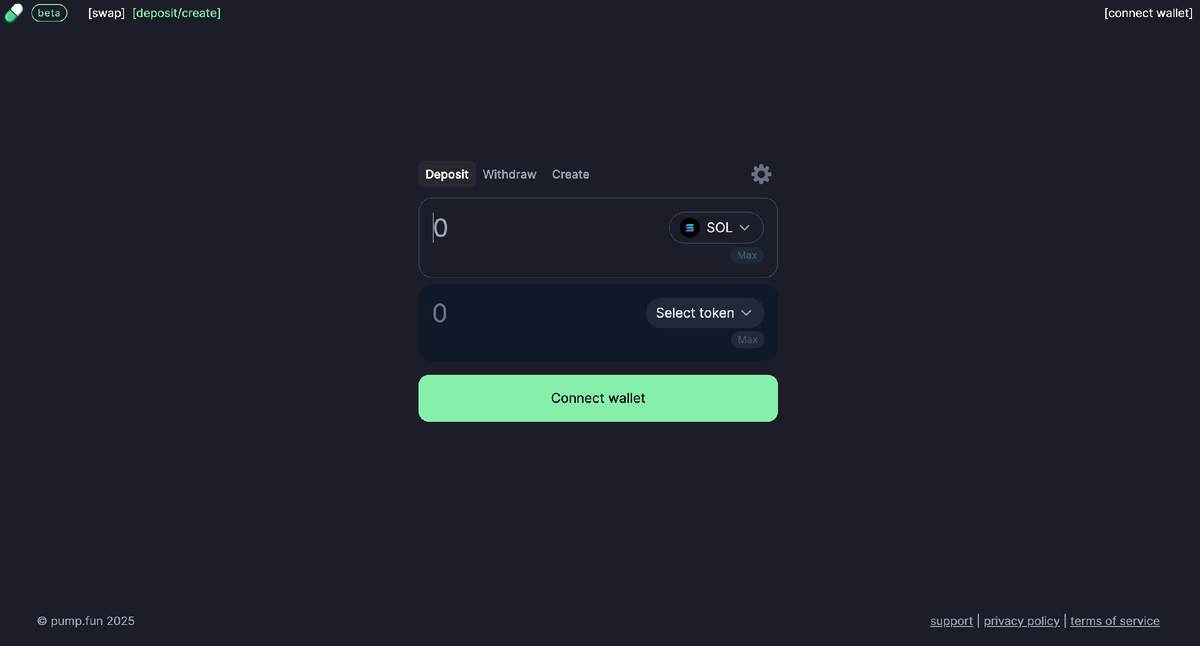
Open the real app and you'll meet a handful of consistent regions. The exact layout shifts over time, but the functions map cleanly to what's happening on-chain.
Swap / Trade
Buy or sell a token. You set the amount, the app shows an estimated quote and slippage, and your wallet signs the swap. See our swap DEX guide for how pricing and slippage really work.
Deposit / Create
The launch side: fund your wallet with SOL and, if you want, create a token on a bonding curve. "Deposit" here means moving SOL into your own wallet, not into a pump.fun account.
Connect Wallet
The gateway. Clicking it opens your wallet to approve a connection. This is your "login" — there's no email or password anywhere. See the login guide.
You'll also see token pages (charts, holder counts, the bonding-curve progress bar), a search/discover feed of new launches, and your portfolio view, which simply reads your wallet's on-chain balances. Nothing in the portfolio is "stored" by pump.fun; it's a live read of public blockchain data tied to your address. For decoding what a token page is telling you before you buy, see the token guide.
Mobile: connecting Phantom in the in-app browser
On a phone, the cleanest and safest route is usually Phantom's built-in browser (Solflare has one too). Instead of opening the site in Safari or Chrome and wrestling with deep links, you open it from inside the wallet, which already knows who you are.
- Open Phantom and find the browser tab (often a compass or globe icon).
- Type the official URL into Phantom's address bar — do not follow a link someone sent you.
- Tap "Connect Wallet." Because you're already inside Phantom, it detects your wallet and asks you to approve the connection.
- Approve the connection (this is read-only — see the next section) and you're in.
The alternative — using a normal mobile browser and connecting via a WalletConnect-style deep link that bounces you to the Phantom app and back — works, but it's clunkier and where beginners most often get tricked by a fake "connect" popup. If you must use it, double-check the domain in the address bar before approving anything. For the full wallet setup, our wallet guide covers it.
Keep a dedicated "hot" wallet on mobile with only the small amount you're willing to trade with. Your main holdings stay in a separate wallet (ideally a hardware wallet) that never touches a memecoin interface. If the trading wallet gets compromised, the blast radius is tiny.
What you actually grant when you connect
People panic about "connecting a wallet" and then sign a wallet-draining transaction without blinking. It should be the other way round. Here's what each step really does.
| Action | What it lets the app do | Can it move your funds? |
|---|---|---|
| Connect | See your public address and read your balances. Request that you sign things. | No |
| Sign a message | Prove you control the address (used for some logins). No on-chain effect by itself. | No |
| Approve a swap transaction | Execute one specific trade you reviewed: this much SOL for that token. | Yes — that trade |
| Approve a token "approval" | Grant a program ongoing permission to spend a token. Often invisible to beginners. | Yes — potentially repeatedly |
The takeaway: connecting is harmless; signing is where the risk lives. Every wallet popup tells you what you're about to authorize. If a swap for "1 SOL → some token" suddenly shows a request involving a different token, an unfamiliar program, or an unlimited approval, reject it. Scammy sites disguise drain transactions as routine swaps. When in doubt, hit reject — the worst case is you redo a legitimate trade.
Your wallet's signature screen is the last line of defense, and it works only if you read it. Check which program is being called, which tokens move, and whether you're granting an open-ended approval. Slow down for that one screen.
Performance and accessibility on Solana
The reason a click-to-trade interface like this feels instant is the chain underneath. Solana targets roughly 400-millisecond block times and fees that are typically a tiny fraction of a cent, per the official pump.fun and Solana documentation (figures vary with network conditions and may change). That's what makes "tap, sign, done" possible without waiting on a slow, expensive settlement layer. We unpack the trade-offs in the Solana guide.
It is not flawless. During hype-driven congestion you'll hit:
- Failed transactions that still cost you a small fee, because the network was too busy to land them.
- Higher priority fees — effectively a tip to get your transaction processed sooner.
- Stale quotes on fast-moving tokens, so the price you sign at differs from what you saw a second ago. That's what slippage tolerance is for.
Solana has also suffered full network outages in its history. When the chain halts, the app can't do anything — there's no central server pump.fun can flip to keep you trading. On accessibility: it's a modern web app, so it works across desktop and mobile browsers, but it leans heavily on real-time charts and color (red/green) to convey state, which isn't ideal for low-vision or colorblind users. Don't expect screen-reader-grade polish; expect a fast trading UI.
How to use the pumpfun app safely, step by step
- Get to the real app the boring way. Use a bookmark or type the official URL. Never click an "app" or "download" link from social media, DMs, or ads.
- Use a dedicated trading wallet. Fund a separate Phantom/Solflare wallet with only what you can afford to lose. Keep savings elsewhere.
- Confirm the domain before connecting. Look at the address bar character by character. Lookalike domains are the whole scam.
- Connect, then breathe. Connecting is read-only. Don't rush into the first token you see.
- Read every signature prompt. Verify the token, the amount, the program, and whether it's an open-ended approval. Reject anything that doesn't match what you intended.
- Set a sane slippage. Too tight and trades fail; too loose and bots can sandwich you. Adjust per token volatility — see the swap guide.
- Ignore "claim" and "airdrop" popups inside or around the app. Most are bait that lead to drain transactions. Check the airdrop guide before claiming anything.
- Disconnect when done and periodically review token approvals you've granted, revoking ones you no longer need.
Pros and cons of the pumpfun app
👍 Pros
- Genuinely non-custodial — nobody can freeze or seize your funds.
- No account, no KYC, no email; your wallet is your login.
- Fast and cheap thanks to Solana's speed and low fees.
- Works on desktop and mobile browsers; smooth inside Phantom's in-app browser.
- Transparent — every action is a public, on-chain transaction you can verify.
👎 Cons
- Zero safety net: one bad signature can drain you, with no support line.
- Surrounded by fake APKs and clone sites built to phish seed phrases.
- Most tokens it surfaces are high-risk; rug pulls and honeypots are routine.
- Failed transactions and high priority fees during congestion.
- Depends entirely on Solana uptime — outages stop everything.
- Accessibility is basic; heavy reliance on color and live charts.
App safety: our audit read
Scores are our subjective editorial assessment, not a formal audit. The interface itself is sound; the low marks reflect how unforgiving self-custody is and how aggressively the surrounding ecosystem is targeted by scammers.
The pumpfun app is a competent non-custodial interface, but it hands you a loaded tool with no guardrails. The app rarely loses your money on its own — fake copies, careless signatures, and the tokens you choose do. Use the real URL, read every prompt, and only risk what you can afford to lose entirely.
FAQ
Is there an official pump.fun mobile app?
The primary product is a web app you open in a browser. The official pump.fun site is the only place to confirm whether a native mobile app or installable PWA exists and what its real link is. Be extremely skeptical of any "pump fun app" on third-party APK sites or unofficial store listings — fake clones built to steal seed phrases are common.
Is the pumpfun app safe to use?
The genuine interface is non-custodial: it never holds your funds and you sign every action yourself. The risk isn't the interface but what you approve with it — malicious tokens, scam transactions, and fake copies of the app. Safety depends almost entirely on using the real URL and reading every signature request.
Can I connect Phantom on my phone?
Yes. The smoothest path is opening the official site inside Phantom's built-in browser, which detects your wallet automatically. You can also use a normal mobile browser with WalletConnect-style deep links, but that flow is more error-prone for beginners.
What permissions does connecting my wallet grant?
Connecting lets the site see your public address and balances and request signatures. Connection alone does not move funds. The danger is the transactions you later approve — including token approvals that grant ongoing spending access — so review each prompt carefully.
Why does a "pump fun app download" APK ask for my seed phrase?
Because it's a scam. No legitimate wallet or interface ever needs your 12 or 24-word seed phrase typed into an app or website. Any "pumpfun app" that asks you to enter, import, or "verify" a seed phrase is built to drain your wallet. Delete it immediately.
Does the app work well on Solana's network?
Solana's sub-second blocks and low fees are why click-to-trade feels instant. During heavy congestion you may hit failed transactions or higher priority fees, and the network has had outages historically. The app is only as reliable as the chain beneath it.
Prefer a regulated, custodial app?
If signing your own transactions makes you nervous, start on a KYC'd exchange and move to self-custody when you're ready.