PumpSwap Guide is an independent educational project. We are not affiliated with, endorsed by, or operated by pump.fun or PumpSwap. Any fee figures are taken from the official pump.fun site and may change — always verify live numbers there before you trade.
- DEX vs centralized order book
- How an AMM actually prices a trade
- Graduation: bonding curve to liquidity pool
- How to do a swap, step by step
- Slippage, in plain English
- Price impact on thin liquidity
- Fees: the headline number isn't the cost
- MEV and sandwich attacks
- Failed transactions that still cost SOL
- DEX vs CEX comparison
- Verify the mint address before you swap
- FAQ
DEX vs a centralized order book
Start with the word people skip past. A DEX — decentralized exchange — is a set of smart contracts that swaps one token for another with no company sitting in the middle holding your coins. A centralized exchange (CEX) like Coinbase or CEX.IO runs a traditional order book: buyers post bids, sellers post asks, and the venue's matching engine pairs them off. The exchange custodies your balance, so when you "buy", you're really updating a number in their database.
PumpSwap is the first kind. There is no order book and nobody to match you with a counterparty. Instead you trade against a pool of tokens, and a formula decides the price. That difference drives everything that follows on this page: who holds your money, why prices move when you trade, and why there's no support line when something goes wrong.
A CEX is a bank with a help desk. A DEX is a vending machine that does exactly what the contract says — including emptying your wallet if you tell it to. Neither cares about your intentions; only the DEX is honest about it.
How an AMM actually prices a trade
PumpSwap, like most Solana and Ethereum DEXs, uses an automated market maker (AMM). The most common design is a "constant product" pool. Picture a pool holding two assets — say SOL and a token called $EXAMPLE. The contract tries to keep the product of the two balances roughly constant. When you buy $EXAMPLE with SOL, you add SOL to the pool and remove $EXAMPLE. Because there's now less $EXAMPLE left, each remaining unit is worth more, so the price ticks up as your order fills.
Three consequences fall straight out of this design, and they explain almost every "why did that happen" question newcomers have:
Price moves as you trade
There's no fixed price. The bigger your order relative to the pool, the worse the average price you get. This is price impact.
Liquidity is everything
A deep pool absorbs your trade with little movement. A thin pool lurches on a small order — which is the norm for new tokens.
Everything is public
Your pending swap sits in the open before it confirms. Bots can see it and trade around it. More on that below.
Liquidity providers (LPs) deposit both assets into the pool and earn a cut of the swap fees in return. On PumpSwap, a freshly graduated token's pool is seeded from the bonding-curve liquidity, but it can still be shallow compared with a blue-chip pair on a major DEX. Shallow pools are where the painful lessons live.
Graduation: from bonding curve to liquidity pool
This is the bit unique to the pump.fun ecosystem, and it's worth getting right. A new token doesn't start life on PumpSwap. It starts on a bonding curve inside pump.fun itself.
- On the curve The token's price follows a fixed mathematical curve. Early buys are cheap; the price rises along the curve as more SOL flows in. You're trading against the curve, not against a pool of LPs. See our token guide for how the curve and the standard 1B supply work.
- The target fills When enough SOL has been raised to hit the curve's threshold (the figure is published on the official pump.fun site and may change), the token is ready to "graduate".
- Migration The collected liquidity is moved into a standard AMM pool on PumpSwap. From this moment the token trades like any other AMM pair, priced by the ratio of assets in the pool rather than by the curve.
- Open market Anyone can now swap, and — depending on the pool's configuration — provide liquidity. Price discovery is fully market-driven, for better and (usually) for worse.
"Graduated" only means a token raised enough SOL to migrate. It says nothing about whether the project is legitimate, whether the team will dump, or whether liquidity will stay. Plenty of graduated tokens still go to zero within hours. Don't read it as a green light.
How to do a swap, step by step
The mechanics are simple; the discipline around them is what protects you. The screenshot below shows a typical swap panel — your wallet's interface may look different but the controls are the same.
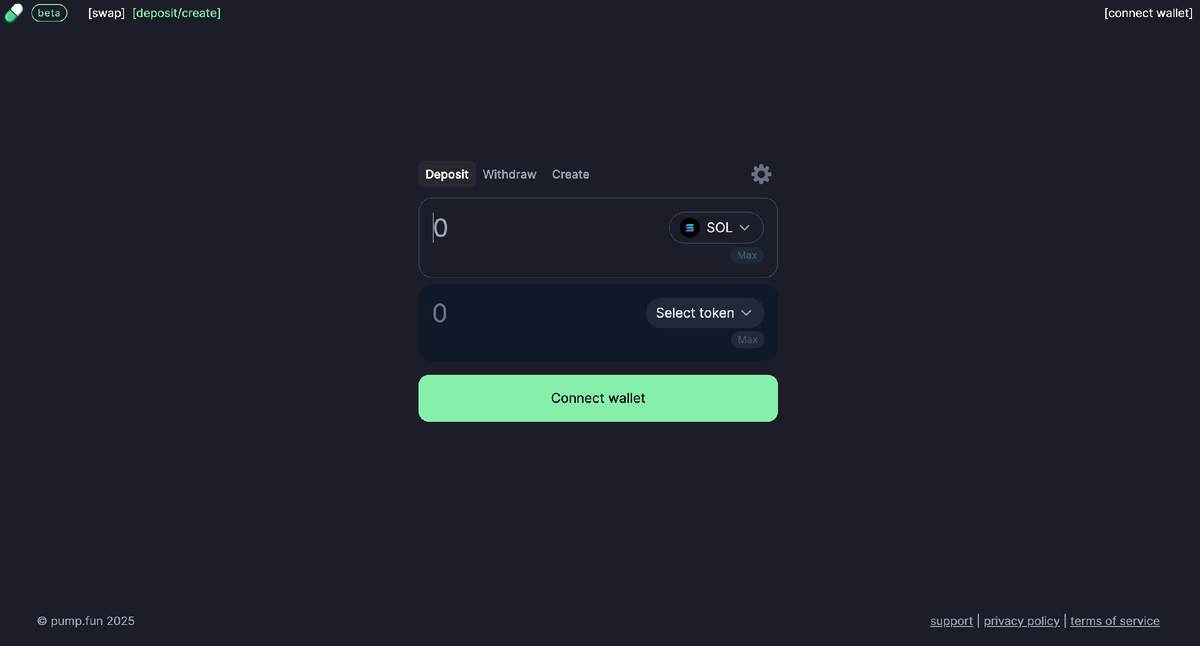
- Connect a Solana wallet Use Phantom, Solflare or similar, funded with SOL for fees. Your wallet is your login — there's no account. See the login guide for connecting safely and the wallet guide for seed-phrase survival rules.
- Confirm the mint address Before anything else, verify the token's full mint address against an official source. This single step blocks most copy-paste scams — details in the warning below.
- Set the pay and receive tokens Put SOL (or USDC) in the "from" field and the target token in the "to" field. The interface estimates how much you'll receive based on the current pool state.
- Enter your amount Type the amount to spend. Watch the estimated output and the displayed price impact — if it's alarmingly high, your order is too big for the pool.
- Set slippage sensibly Open the settings icon and choose a slippage tolerance. Tighter is safer but more likely to fail; looser fills more often but invites sandwich bots. See the slippage section.
- Review, then sign Read the wallet pop-up carefully. Check the token, the amount, and that you're only approving a swap — not an open-ended token approval or a transfer to an unknown address.
- Wait for confirmation Solana usually confirms in well under a second when the network is healthy. The Solana page explains why, and what happens during congestion.
The confirm-and-sign moment is where attackers want you to be careless. The app walkthrough covers exactly what permissions a connect request grants. Treat every signature as if it could move your whole balance, because some signatures can.
Slippage, in plain English
Slippage is the gap between the price you saw when you clicked and the price you actually got when the trade confirmed. On a fast-moving AMM, those two moments are not the same. By the time your transaction lands, other people may have traded the same pool, shifting the price.
Your slippage tolerance is the maximum gap you're willing to accept. Set it to 1% and the swap will revert if the price would be more than 1% worse than quoted. Set it to 20% and you're telling the contract "fill me almost no matter what" — which is sometimes the only way to get into a frantic, thin token, and also exactly the setting bots pray for.
👍 Lower slippage
- Protects you from bad fills.
- Makes sandwich attacks unprofitable.
- Best on liquid pools and calm markets.
👎 Higher slippage
- Trade fills more reliably on thin tokens.
- But you may accept a much worse price.
- Leaves room for bots to front-run you.
Start with the tightest slippage that still lets your trade through, and raise it only as much as you must. If a token needs 30% slippage to fill, that's not a "feature" — it's the market telling you the pool is dangerously thin.
Price impact on thin liquidity
Slippage is about timing; price impact is about size. Price impact is how much your own order moves the price by depleting one side of the pool. The two often get lumped together, but they're different beasts. Even with zero competing traders and perfect timing, a large buy into a small pool gets a terrible average price simply because the AMM math punishes big orders.
Quick intuition: in a deep pool, spending 1 SOL barely nudges the ratio. In a pool that only holds a few SOL of liquidity, the same 1 SOL might move the price 20% or more — and you eat that move on the way in and again on the way out when you sell. This round-trip cost is why so many memecoin "gains" evaporate the moment you try to exit.
A token can show a big paper gain while it's impossible to sell for anything near that price. If the pool is thin, your sell order will crash the price as it fills. Always check whether there is enough liquidity to get out, not just in. On the thinnest tokens, you may be the exit liquidity for someone else.
Fees: the headline number isn't the real cost
People fixate on the swap fee percentage and ignore the costs that actually hurt. Here's the full stack, in roughly the order it matters.
| Cost | What it is | Roughly how big |
|---|---|---|
| Swap fee | The protocol's cut on each trade, partly paid to liquidity providers. | A small percentage per the official pump.fun site (commonly cited around 1%, may change) |
| Network base fee | Solana's charge to process the transaction. | A tiny fraction of a cent in normal conditions |
| Priority fee | Optional tip to validators to get included faster during congestion. | Varies; rises sharply when the network is busy |
| Price impact | The cost of moving the price yourself on a thin pool. | Often the largest cost by far on small tokens |
| MEV / sandwich loss | Value extracted by bots trading around your order. | Hidden; grows with high slippage |
*Fee figures summarised from the official pump.fun website, accessed 2026. Verify live numbers there — they can change without notice.
The lesson: the advertised swap fee is usually the smallest line on this list. On a thin token, price impact and MEV can cost you many times the headline percentage. Anyone who tells you a DEX is "basically free" is reading one line of a five-line bill.
MEV and sandwich attacks
Because pending transactions are visible before they confirm, automated bots can profit by ordering trades around yours. The classic move is a sandwich attack:
- The bot sees your buy Your pending swap is public, including your slippage tolerance.
- It front-runs you The bot buys the same token first, pushing the price up.
- You fill at the worse price Your order executes at the inflated price — within your slippage limit, so it doesn't revert.
- It dumps on you The bot immediately sells into your trade, pocketing the difference. You paid; the bot earned.
This is a subset of MEV (maximal extractable value) — profit captured purely by controlling transaction ordering. It's not a bug in your wallet; it's a structural property of open mempools. You can't eliminate it, but you can shrink it:
Keep slippage as tight as the trade allows — sandwiches are only profitable when there's room to move the price within your tolerance. Avoid round, obvious order sizes during volatile moments. Some wallets and routers offer private transaction submission or MEV-protected RPCs; if yours does, use it for larger trades. And remember that thin pools amplify every one of these problems.
Failed transactions that still cost SOL
New users are furious the first time this happens, so let's be blunt: on Solana, a failed swap can still cost you SOL. You pay validators to attempt your transaction. If it then reverts — because the price moved past your slippage, the pool state changed, or you were beaten to a thin pool — the network already did the work, so the fee is not refunded.
During hot launches you may burn several small fees on failed attempts before one lands. That's the cost of competing for a fast-moving pool against bots and thousands of other humans. It feels unfair; it is simply how a public, fee-priced network rations block space.
Convert crypto in seconds→If you can't stomach paying for trades that don't go through, the memecoin DEX game is not for you. Failed-and-charged is the toll booth, not a malfunction.
DEX vs CEX: which fits what you're doing
Neither model is "better" in the abstract. They optimise for different things. Here's the honest side-by-side.
| Feature | PumpSwap (DEX) | Centralized exchange (CEX) |
|---|---|---|
| You hold your own keys | Yes | No |
| Account / password | None — wallet is login | Yes |
| KYC identity checks | No | Usually required |
| Password / account recovery | Impossible | Support can help |
| Access to brand-new tokens | Immediately | Rarely, much later |
| Order book & limit orders | No — AMM only | Yes |
| Protection from scam listings | None — you verify | Some vetting |
| Insurance / accountability | None | Varies by venue |
| Sandwich / MEV exposure | Yes — public mempool | Largely shielded |
A common, sane pattern: keep the bulk of your funds on a regulated, insured exchange, learn how buying and withdrawing work there, and move only a small, disposable amount into a hot wallet for on-chain swaps. If you need an on-ramp, you can convert fiat to crypto on CEX.IO and withdraw to your own wallet afterwards.
Verify the mint address before you swap
This is the single most important habit on this page, so it gets the red box.
How to do it without losing your mind:
- Get the address from the source Use the legitimate token's official page or the project's verified channels — never a random link in a chat or reply.
- Compare, don't glance Check the first and last several characters, and ideally the whole string. Scammers love look-alike addresses.
- Check liquidity and holders A block explorer shows pool size and holder distribution. One wallet holding most of the supply is a screaming red flag.
- Beware fresh copies A "token" launched minutes ago with a famous name is almost always an impostor riding the hype.
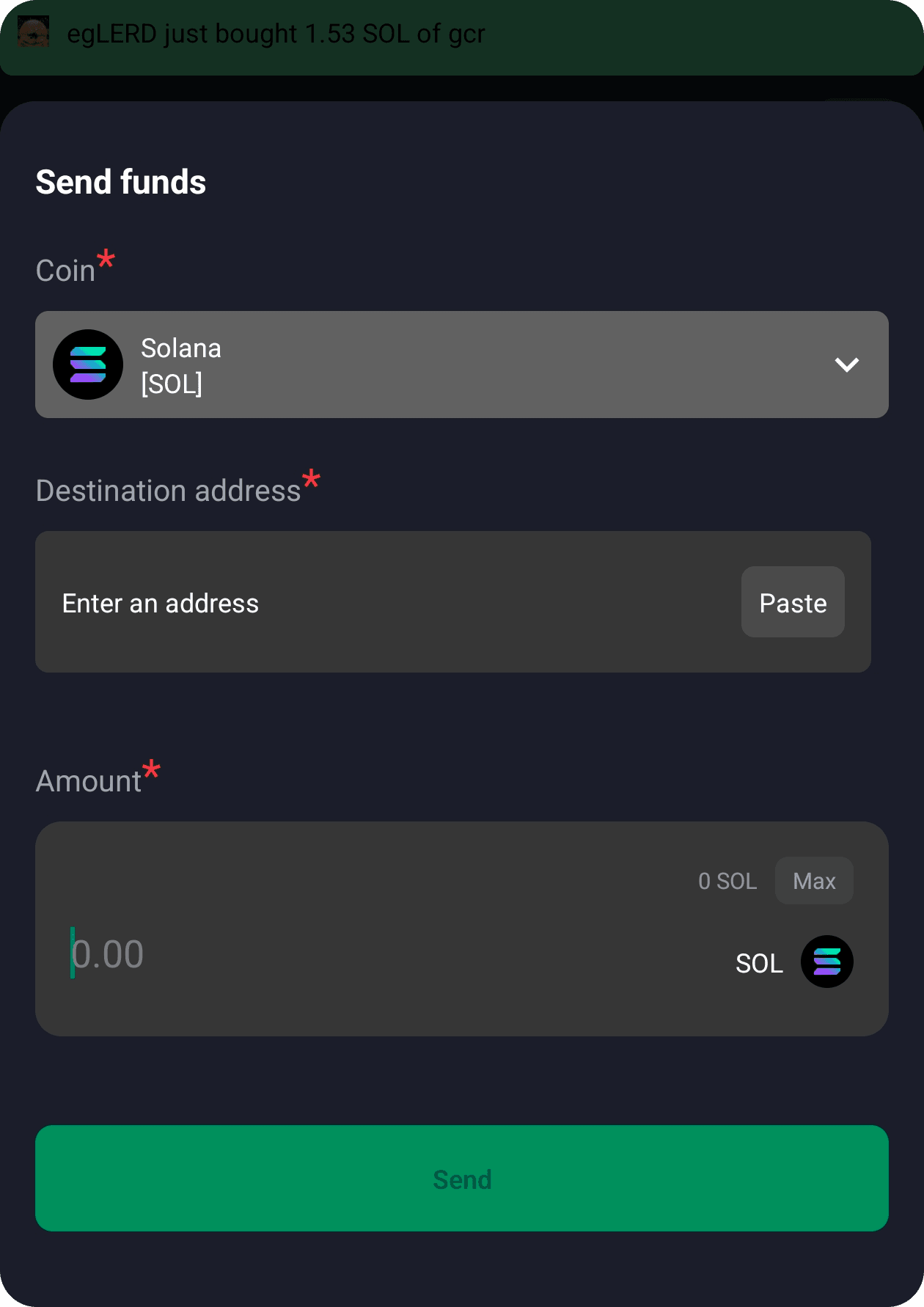
The send-and-confirm flow below is also where wallet drainers strike, by disguising a malicious approval as a normal swap. Read every signature request.
No legitimate swap, support agent, airdrop or "verification" will ever need your seed phrase. Anyone asking for it is stealing your wallet. See the airdrop guide for the variants of this scam, and the wallet guide for how to store keys safely. Developers wiring up swaps programmatically should read the API page for safe-handling notes.
FAQ
What is the pumpfun swap dex?
It's PumpSwap, the Solana decentralized exchange where pump.fun tokens trade after they graduate from the bonding curve. It uses an automated market maker (AMM) liquidity pool instead of a central order book, so you swap directly from your own wallet with no account and no custodian.
What does graduation from the bonding curve mean?
While a token is on the bonding curve, the price follows a formula as people buy and sell against pump.fun directly. When the curve fills to its target, the platform migrates the collected liquidity into a standard AMM pool on PumpSwap. From then on the token trades like any other AMM pair, priced by the ratio of the two assets in the pool.
Why did my swap fail but still cost SOL?
On Solana you pay a base fee, and often a priority fee, just to have validators process your transaction. If the price moved past your slippage limit or the pool state changed, the transaction reverts but the network work was already done, so the fee isn't refunded. Failed swaps are a normal cost of trading thin, fast-moving pools.
How do I set slippage on PumpSwap?
Open the settings or gear icon on the swap panel and enter a maximum slippage percentage. A higher number means your trade is more likely to go through but you accept a worse possible price. On low-liquidity tokens people often raise slippage to get filled, which is exactly when sandwich bots profit most.
How can I avoid swapping a fake scam token?
Always verify the full token mint address against an official source, not just the ticker or name. Scammers create copies with identical names and logos. Copy the mint address from the legitimate token page, paste it into the swap, and check it character by character on a block explorer before you sign anything.
Are PumpSwap fees fixed?
No. The official pump.fun site publishes the current swap fee, and that figure may change at any time. There's also the Solana network fee and any priority fee you add, plus price impact on thin liquidity, which can dwarf the headline fee on a bad trade.
Need clean SOL to swap with?
Buy and convert crypto on a regulated exchange, then withdraw to your own wallet before you trade on-chain.