⚠ This is not the official pump.fun or PumpSwap website. PumpSwap Guide is an independent, educational project. Always confirm the genuine URL yourself before connecting a wallet.
- Why there's no registration at all
- Why wallet-based auth exists
- Wallet login vs CEX registration
- Step by step: connecting Phantom or Solflare
- What “Sign message” actually means
- Fake login pages and wallet drainers
- Session & disconnect hygiene
- Using multiple wallets
- “Recovering access” = your seed phrase
- FAQ
Why there's no registration at all
If you came here looking for a “create account” button, stop looking. It doesn't exist, and that's by design rather than an oversight. pump.fun and its DEX, PumpSwap, are non-custodial interfaces sitting on top of the Solana blockchain. They don't store your balance, your trade history or your money in a database they control. All of that lives on-chain, tied to a wallet address that only you can sign for.
So the act people think of as “registering” — handing over an email, picking a password, clicking a verification link — has no equivalent here. The closest thing is connecting a wallet, which takes about three clicks and creates nothing on a server you'd need to log back into. The first time you connect, you're not signing up; you're just introducing your existing wallet to the website.
Custodial exchange = a bank: they hold your money and give you a username/password to access it. Non-custodial app like pump.fun = your own safe: you hold the key (the seed phrase), and the website is just a remote control that asks your wallet to do things. No key, no access — for anyone, including you.
Why wallet-based auth exists
Wallet-based authentication isn't a gimmick. It solves a real problem and creates a different one, and it's worth understanding both before you trust it with money.
The problem it solves: traditional logins are a giant honeypot. Every email/password database is a target, breaches leak millions of credentials, and password reuse means one leak compromises ten accounts. Wallet auth sidesteps all of that. There's no password to steal because there's no password. The site never holds a credential that could be breached, because proving you own an address is done with a cryptographic signature your wallet generates locally and never sends your private key.
The problem it creates: there is no safety net. With a bank or a centralized exchange, a forgotten password is an inconvenience — you click a link, prove your identity, and you're back in. With wallet auth, the “password” is your seed phrase, and there is no human on the other end who can reset it. Lose it with no backup and the account is gone permanently. You've traded breach risk for personal-responsibility risk.
Wallet auth moves the single point of failure from a company's server to your own backup discipline. Whether that's an upgrade depends entirely on how seriously you take that backup.
For the chain-specific reasons this all runs on Solana — cheap fees, fast blocks — see our Solana explainer. For the wallet itself, the wallet guide covers setup and seed-phrase survival rules.
Wallet login vs CEX registration: side by side
The mental model most newcomers bring is the centralized exchange (CEX) — Coinbase, Binance, CEX.IO. That model is almost the opposite of how pump.fun works. Here's the honest comparison.
| Step / feature | Centralized exchange (CEX) | pump.fun / PumpSwap (wallet) |
|---|---|---|
| Email & password sign-up | Yes | No |
| KYC / ID verification | Usually required | None |
| Who holds your coins | The exchange | You (your wallet) |
| Password reset / account recovery | Yes, via support | No — seed phrase only |
| Can a help desk freeze/restore your account | Yes | No one can |
| Insurance / accountability | Sometimes, regulated | None |
| How you “log in” | Username + password (+ 2FA) | Connect wallet + sign a message |
| Time to start | Minutes to days (KYC review) | Seconds, once a wallet exists |
Neither column is strictly “better.” A CEX gives you a reset button and a complaints department; it also gives a third party full control of your funds and your data. The wallet model gives you control and privacy; it also hands you the entire burden of not screwing up. Many experienced users run both — bulk funds on a regulated exchange, a small disposable amount in a hot wallet for memecoin swaps.
Step by step: connecting Phantom or Solflare
“Logging in” on pump.fun means connecting a Solana wallet. Phantom and Solflare are the two most common. Assuming you've already created and backed up a wallet (do that first — see the wallet guide), the flow looks like this:
- Reach the genuine site Open the real URL from your own bookmark, not from a search ad, a DM or a link in a Telegram group. Phishing clones often pay to rank above the real thing. Confirm the address bar character by character.
- Click “Connect wallet” Usually top-right. A small panel lists supported wallets (Phantom, Solflare, Backpack and others). Pick the one you installed.
- Approve the connection in your wallet Your wallet extension or app pops up showing the site's domain and asking to connect. Check that the domain is exactly right. Connecting only shares your public address and lets the site request signatures — it does not move funds.
- Sign the login message (if asked) Some sites ask you to sign a short text message to prove you control the address. This is free, moves nothing, and is normal. Read it — it should look like a plain login statement, not a transaction. More on this below.
- You're “in” The button now shows your address and balance. That's the whole login. There's no confirmation email, no second account, nothing to remember beyond the wallet itself.
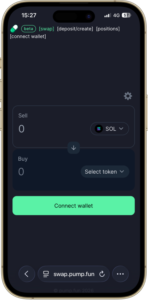
On phones, wallet connection often happens inside the wallet app's built-in browser rather than Chrome or Safari. That's normal, but it also means scammers push you toward “open in wallet browser” to make a malicious prompt look routine. Same rule applies: verify the domain in the prompt, every time.
What “Sign message” actually means — and why it's not the same as a transfer
This single distinction prevents a large share of drained-wallet stories, so read it twice.
There are two very different things your wallet can be asked to do:
👍 Signing a message
- Proves you control the wallet.
- Costs zero SOL.
- Moves zero funds, grants zero permissions.
- Used for login / “sign in with wallet”.
- The text is usually human-readable.
👎 Approving a transaction
- Can transfer tokens out of your wallet.
- Can grant a contract permission to spend your tokens later.
- Costs a small SOL network fee.
- This is where wallets actually get drained.
- Often shown as code-like instructions, not plain English.
A legitimate login asks only for a message signature. If a “login” or “verify” or “claim” prompt instead asks you to approve a transaction — especially one requesting a token allowance or transfer — that is a giant red flag. Drainers love disguising a fund-moving transaction as a harmless “verify your wallet” step.
Malicious sites present a transaction approval and label it “Sign to log in” or “Verify ownership.” If you approve without reading, you may have just authorized a transfer or an unlimited spending allowance. Rule of thumb: a real login never needs to move SOL or grant token permissions. If you see a network fee or an allowance request on a “login,” reject it.
Fake login pages and wallet drainers
Because there's no password to steal, attackers go after the next best thing: tricking you into signing something malicious, or simply conning you out of your seed phrase. Fake “login” and “connect” pages are the main vehicle. They clone the real interface pixel for pixel, sit on a near-identical domain, and wait.
Common attack patterns to recognize:
Lookalike domains
A swapped letter, an extra word, a different ending. Paid search ads and fake tweets push these to the top. Verify the domain character by character.
Fake airdrop / claim pages
“Connect to claim your reward” pages exist to make you approve a draining transaction. See our airdrop safety guide.
Fake “support”
Real support never DMs first and never asks for your seed phrase or a “wallet sync.” That request alone identifies the scammer.
Seed-phrase forms
Any page with a box to paste your 12/24 words is a theft tool. Wallets import seed phrases inside the wallet app only, never in a website.
Urgency & deadlines
“Migrate now or lose access,” “claim ends in 10 minutes.” Pressure is the tell. Slow down and verify.
Blind approvals
Prompts that hide what they do. If you can't read what you're approving, reject it and walk away.
If a site ever pushes you to reveal your recovery phrase to “log in,” “restore,” “sync,” or “validate” your wallet, it is a scam without exception. The seed phrase is the master key; whoever has it owns everything in the wallet, instantly and irreversibly.
Session and disconnect hygiene
Connecting a wallet isn't a permanent marriage, and you shouldn't treat it like one. A few habits keep your exposure small:
- Disconnect when you're done Use the site's “Disconnect” option (click your address, then disconnect). It ends the session so a left-open tab can't quietly request signatures later.
- Revoke stale token approvals Over time you accumulate spending permissions you granted to various sites. Periodically review and revoke them using a reputable Solana approval-checker. An old allowance to a since-compromised contract is a live risk.
- Treat the “connected sites” list as a chore Phantom and Solflare both show which sites your wallet is connected to. Prune anything you don't recognize or no longer use.
- Lock your wallet Set the wallet to auto-lock, and lock it manually on a shared or public machine. A connected-but-locked wallet still requires your approval to sign.
- Be wary of “always allow” options Convenience settings that auto-approve future requests reduce the friction that protects you. For a high-risk memecoin wallet, keep the friction.
Disconnecting doesn't remove a previously granted token allowance — those persist until you revoke them on-chain. Connection state and spending permissions are two separate things. Clean up both.
Using multiple wallets
Since the wallet is the account, you can have as many “accounts” as you have wallets, and switching between them is just switching wallets. This is genuinely useful, not just paranoia:
- A burner / hot wallet for memecoins. Fund it with only what you're willing to lose on a given session. If you ever sign something nasty, the blast radius is capped at that wallet's balance.
- A vault wallet for holdings. Kept on a hardware wallet, never connected to random sites, used only for moving funds in and out deliberately.
- Separation by purpose. Some keep one wallet per activity so a compromise in one doesn't expose the rest.
Phantom and Solflare both let you create or import several accounts and toggle between them. On pump.fun, switching the active wallet simply changes which address — and which balances and history — you're acting as. There's nothing to “merge”; they're independent identities. The trade-off is more seed phrases (or more accounts under one phrase) to back up and keep straight, so don't over-fragment to the point that you lose track of a backup.
“Recovering access” = your seed phrase. There is no password reset.
Let's kill the most dangerous expectation directly. If you lose access to your wallet, the only recovery is your seed phrase (also called a recovery phrase or mnemonic) — the 12 or 24 words generated when you first created the wallet. There is:
- No “forgot password” email, because there's no password.
- No account-recovery form, because pump.fun holds no account to recover.
- No support agent who can restore your funds, because nobody but you ever had the key.
Restoring access means installing a wallet app and importing it with your seed phrase. That's it. Which is exactly why the phrase deserves obsessive care:
Your seed phrase is the entire account. Write it on paper (or metal), store it offline, never photograph it, never put it in cloud storage, and never enter it into a website or give it to “support.” Lose it with no backup and the funds are unrecoverable. Leak it and they're stolen. There is no middle ground and no undo.
If passwordless self-custody sounds like more responsibility than you want on day one, that's a reasonable conclusion — and a normal place to start differently. Learn how buying, selling and withdrawing work on a regulated exchange first, where a forgotten password is just a reset link, then graduate to a wallet when the habits are second nature.
Try a beginner-friendly exchange→
When you're ready for the self-custody side, the app walkthrough shows what you can actually do once connected, and the swap DEX guide covers the trades themselves. For programmatic read-only access, see the developer API page.
FAQ
How do I register an account on pump.fun?
You don't. There is no email-and-password registration. The platform is non-custodial, so connecting a Solana wallet such as Phantom or Solflare creates your identity on the spot. Your wallet address is effectively your account.
I forgot my pump.fun password — how do I reset it?
There is no password and therefore no reset. Access is controlled entirely by your wallet's seed phrase. If you lose that phrase and have no backup, nobody — not pump.fun, not the wallet maker — can restore it.
Is signing a message the same as approving a transaction?
No. A plain message signature proves you control the wallet, costs no SOL and moves no funds. A transaction approval can move tokens or grant spending permissions. Read every pop-up: signatures are usually safe, blind transaction approvals are where wallets get drained.
Can I use more than one wallet to log in?
Yes. Because the wallet is the account, connecting a different wallet switches to a different identity with its own balances and history. Many people keep a small disposable hot wallet for memecoin trading and a separate wallet for everything else.
What is a fake login page and how do I avoid one?
A fake login or connect page imitates the real site to trick you into signing a malicious transaction or pasting your seed phrase. Avoid them by bookmarking the genuine URL, never clicking login links from DMs or ads, and never entering a seed phrase into any website.
Does connecting my wallet give the site access to my coins?
Connecting alone lets a site see your public address and balances and request signatures — it does not move funds by itself. Funds only move when you approve a transaction. The danger is approving a malicious transaction or token-spending allowance without reading it.